Bringing a phone into the gym is a trade-off: it can track your sets, run your rest timer, and hold your entire workout — or it can pull you into a text conversation between sets and quietly stretch a 45-minute session into 75 minutes. Which one happens usually comes down to whether the app you're using was actually designed for use during training, not just for browsing beforehand.
The Problem With Using a Generic App Mid-Workout
Most apps aren't designed with sweaty hands, poor lighting, or split-second attention in mind. Small tap targets lead to mis-taps, screens that dim or lock require repeated unlocking, and a lack of clear "what's next" guidance means you're mentally context-switching between the app and your workout instead of just training.
What a Real Gym Mode Should Include
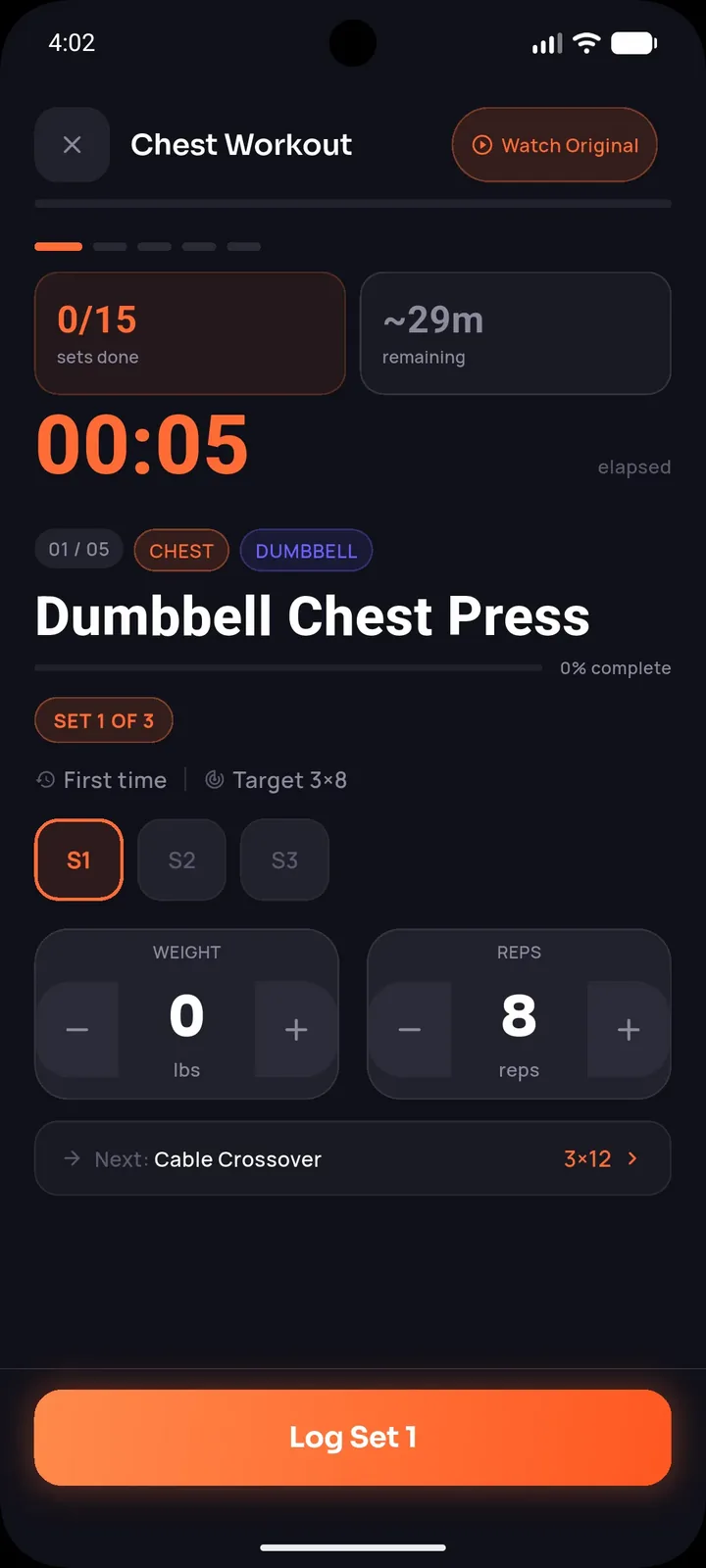
- Large tap targets — buttons and inputs sized for quick, confident taps, not precise small targets
- A screen that stays on throughout the session, so you're not repeatedly unlocking your phone
- An automatic rest timer with sound, so you don't have to watch the screen constantly to know when rest is over
- Previous performance shown per exercise, giving an immediate reference for what you're trying to beat without needing to search your history mid-set
- Minimal navigation — the next exercise and set should be one obvious tap away, not buried in menus
Why This Matters More Than It Seems
Every point of friction during a workout is a small opportunity to get distracted or lose focus — checking a notification "just for a second" while your rest timer is running, or fumbling to find your previous weight for an exercise. These small interruptions add up across a session, both extending your total time at the gym and subtly reducing the quality of your focus on the actual training.
Stop losing workouts in your camera roll.
SetForge turns saved Instagram & TikTok workout videos into structured, trackable training programs — automatically.
How SetForge's Smart Gym Mode Is Built for This
SetForge's Smart Gym Mode was designed specifically around real in-session use: large tap targets so you're not fumbling between sets, an automatic rest timer with sound so you can put your phone down without losing track of time, your previous performance shown right next to each exercise so progressive overload decisions are immediate rather than requiring a search, and a screen that stays on throughout your session so you're not repeatedly unlocking your phone and risking a distraction along the way.
The Difference Between Browsing Mode and Training Mode
A good fitness app recognizes that "planning a workout at home" and "actually doing the workout at the gym" are two very different contexts requiring different interfaces. The browsing experience can afford more detail, more options, more exploration — the training experience needs to be fast, simple, and forgiving of imprecise taps from someone mid-set and out of breath.
Practical Tips for Staying Focused Mid-Workout
- Put your phone in Do Not Disturb or airplane mode if your app doesn't otherwise shield you from notifications during a session
- Pre-plan your workout before starting, so you're not making programming decisions mid-session
- Trust your rest timer rather than checking the clock manually, which often leads to checking other things too
Frequently Asked Questions
Why do small tap targets matter so much during a workout?
Sweaty hands, fatigue, and limited attention mid-set make precise taps harder — larger targets reduce mis-taps and the frustration that comes with them.
Does SetForge's Smart Gym Mode keep my screen from locking during a workout?
Yes — the screen stays on throughout your session, reducing the need to repeatedly unlock your phone.
How does seeing my previous performance help mid-workout?
It gives an immediate reference for progressive overload decisions — whether to add weight or reps — without needing to search your workout history during your session.
Should I put my phone on Do Not Disturb during workouts?
It's a reasonable precaution if your training app doesn't otherwise shield you from notifications mid-session, helping preserve focus.
Is a dedicated gym mode necessary, or can any app work?
A dedicated gym mode designed for in-session use (large targets, automatic timers, always-on screen) meaningfully reduces friction compared to a generic interface not built with training in mind.
The Bottom Line
A phone can either be a genuinely useful training tool or a constant source of mid-workout distraction, and the difference usually comes down to whether the app was built for actual in-session use. Large tap targets, an always-on screen, an automatic rest timer, and visible previous performance are what separate a real gym mode from a browsing interface awkwardly repurposed for the gym floor.